

Overview
OWL DMS supports multiple firmware types for Duck devices, each designed for specific use cases. This guide covers firmware options for both PapaDuck (gateway) and MamaDuck (sensor node) devices.PapaDuck Firmware Variants
PapaDuck devices serve as the gateway between your mesh network and the cloud. Choose the variant that matches your connectivity requirements.PapaDuck WiFi - Standard gateway (WiFi connection)
PapaDuck WiFi - Standard gateway (WiFi connection)
Description:
The standard PapaDuck firmware connects to your WiFi network to relay mesh network data to the cloud. This is the recommended option when you have reliable WiFi coverage at your gateway location.Features:
- Connects to 2.4GHz WiFi networks
- Secure TLS connection to AWS IoT Core
- Receives and forwards all mesh network messages
- Queues messages when temporarily disconnected
- LED status indicator for connection state
LED Status Indicators:
Use Cases:
- Indoor gateway installations
- Locations with reliable WiFi coverage
- Office or building deployments
- Home mesh network setups
PapaDuck WiFi + LTE - Dual connectivity gateway (WiFi with cellular fallback)
PapaDuck WiFi + LTE - Dual connectivity gateway (WiFi with cellular fallback)
Description:
This advanced PapaDuck variant provides dual connectivity using both WiFi and LTE cellular. WiFi is the primary connection, but if WiFi becomes unavailable, the device automatically falls back to LTE to ensure your mesh network data always reaches the cloud.Features:What You Need to Provide:Connection Priority:
- Primary WiFi connection with automatic LTE fallback
- Seamless switching between WiFi and cellular
- Periodic WiFi reconnection attempts (every 10 minutes when on LTE)
- Secure TLS connection over both WiFi and cellular
- Message queuing during connection transitions
- LED status indicator for connection state
The LilyGo T-SIM7000G board combines the SIM7000G cellular modem with an ESP32. You need the version with the LoRa hat attachment to enable mesh network communication.
- LilyGo T-SIM7000G board with LoRa Hat - Available from LilyGo or electronics retailers
- Hologram SIM card - The firmware is configured for Hologram SIM cards. You must activate the SIM and add a data plan on the Hologram dashboard at hologram.io before use. Other IoT SIM providers may work but are not officially supported.
- WiFi credentials - Your 2.4GHz network SSID and password
- LTE antenna - Usually included with the board
Hologram SIM setup required before flashing: Create an account at hologram.io, activate your SIM, and add a data plan. The device will not connect over LTE until the SIM has an active plan.
LED Status Indicators:
Connection Behavior:
- On startup, attempts WiFi connection first
- If WiFi fails after 3 retries, initializes LTE modem
- When on LTE, periodically checks for WiFi availability (every 10 minutes)
- Automatically switches back to WiFi when it becomes available
- Messages are queued if both connections temporarily fail
- Remote or outdoor gateway installations
- Locations with unreliable WiFi
- Mobile gateway deployments
- Disaster response and emergency networks
- Agricultural or rural deployments
- Backup connectivity for critical networks
MamaDuck Firmware Types
MamaDuck devices collect sensor data and relay messages through the mesh network. Some firmware types require physical sensors to be connected to GPIO pins.GPS Location - Track device location (No external sensors required)
GPS Location - Track device location (No external sensors required)
Description:
Sends GPS coordinates periodically through the mesh network, perfect for asset tracking and mobile monitoring applications.Features:
Sends GPS coordinates periodically through the mesh network, perfect for asset tracking and mobile monitoring applications.Features:
- Built-in GPS functionality (no external sensors needed)
- Periodic location updates
- Configurable update intervals to optimize battery life
- Latitude, longitude, and altitude tracking
Hardware Requirements:
- No external sensors required
- GPS module included in standard MamaDuck hardware
Barometric Pressure Sensor - Temperature & pressure (Requires sensor)
Barometric Pressure Sensor - Temperature & pressure (Requires sensor)
Description:
Monitors temperature and atmospheric pressure. The BMP180, BMP280, and BMP390 are all covered under this single firmware type — you select your specific sensor model during configuration.Features:
Monitors temperature and atmospheric pressure. The BMP180, BMP280, and BMP390 are all covered under this single firmware type — you select your specific sensor model during configuration.Features:
- Temperature measurement (-40°C to +85°C)
- Barometric pressure monitoring
- Low power consumption
- I2C communication protocol
Configuration Options:
Hardware Connection:All BMP variants use I2C and share the same wiring.Required Components:
- BMP180, BMP280, or BMP390 sensor module
- 4 jumper wires
DHT11 Sensor - Temperature & humidity (Requires sensor)
DHT11 Sensor - Temperature & humidity (Requires sensor)
Description:
Monitors temperature and relative humidity using the DHT11 sensor. Perfect for indoor climate monitoring and agricultural applications.Features: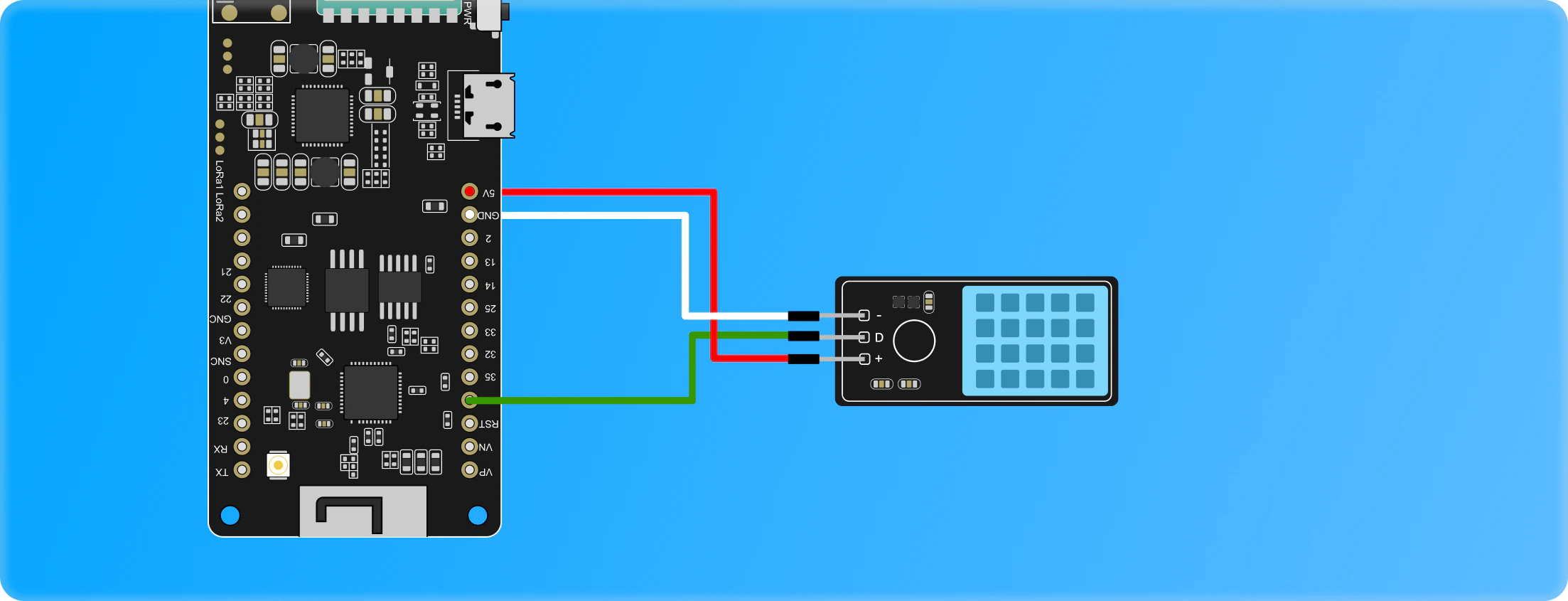
Monitors temperature and relative humidity using the DHT11 sensor. Perfect for indoor climate monitoring and agricultural applications.Features:
- Temperature measurement (0-50°C)
- Relative humidity (20-90%)
- Cost-effective solution
- Simple single-wire digital interface
Hardware Connection:Required Components:
- DHT11 sensor module
- 3 jumper wires
DHT11 sensors can work with both 3.3V and 5V. Check your module’s specifications. Some modules have built-in pull-up resistors.
LED Control - Rainbow LED patterns (Requires LEDs)
LED Control - Rainbow LED patterns (Requires LEDs)
Description:
Controls external addressable LEDs (NeoPixel/WS2812B) to display rainbow patterns. Useful for visual indicators, device testing, and demonstrations.Features: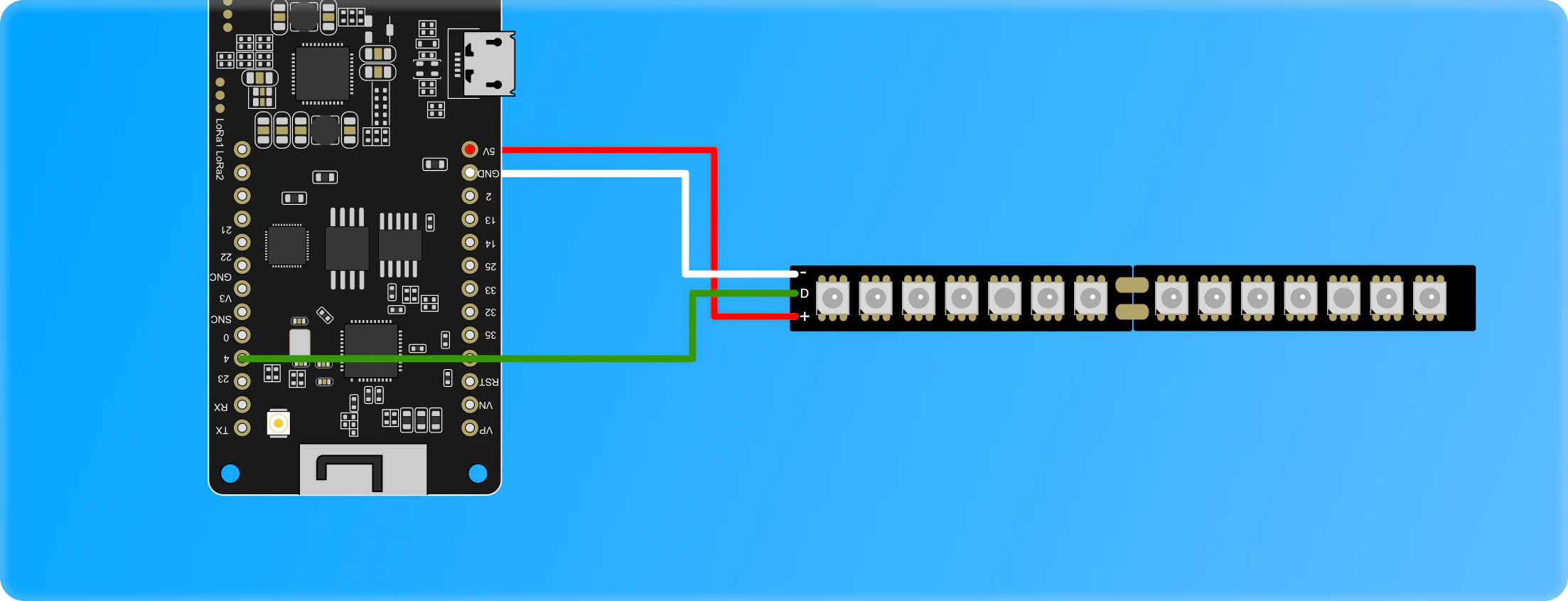
Controls external addressable LEDs (NeoPixel/WS2812B) to display rainbow patterns. Useful for visual indicators, device testing, and demonstrations.Features:
- Rainbow pattern display
- Supports multiple LEDs in series
- Addressable RGB control
- Configurable LED count
Hardware Connection:Required Components:
- WS2812B LED strip or NeoPixel ring
- External power supply (for >8 LEDs)
- Jumper wires
For More LEDs (>8):Power Considerations:
Configuration Best Practices
Extend Battery Life
Extend Battery Life
- Disable external LEDs: Turn off when not needed for testing
- Choose appropriate sensors: BMP390 uses less power than DHT11 at high sampling rates
Improve Data Accuracy
Improve Data Accuracy
- BMP sensors: Allow 2-3 minutes warm-up time after power-on
- DHT11: Don’t sample faster than once every 2 seconds
- GPS: Allow clear view of sky for best accuracy
- All sensors: Protect from direct sunlight and moisture
Sensor Installation Tips
Sensor Installation Tips
- Verify voltage levels: Most sensors use 3.3V, some tolerate 5V
- Use quality jumper wires: Poor connections cause intermittent failures
- Secure connections: Use hot glue or electrical tape to prevent disconnections
- Test before deployment: Verify sensor readings before field installation
- Document GPIO pins: Note which pins you used for future reference
Troubleshooting
Sensor not detected
Sensor not detected
Check:
- Sensor is properly connected to correct GPIO pins
- Power and ground connections are secure
- GPIO pin number matches firmware configuration
- Sensor is compatible (voltage levels)
- Verify wiring with multimeter
- Try different GPIO pins
- Check sensor with example code
Inaccurate sensor readings
Inaccurate sensor readings
Common causes:
- Sensor needs warm-up time
- Poor electrical connections
- Sensor damaged or counterfeit
- Sampling rate too high
- Wait 2-3 minutes after power-on
- Replace jumper wires
- Source sensors from reputable suppliers
- Increase sensor interval
GPS not getting fix
GPS not getting fix
Check:
- Device has clear view of sky
- GPS antenna is connected
- Allow 1-2 minutes for initial fix
- Not indoors or under heavy foliage
- Move to open area
- Check antenna connection
- Wait for initial satellite lock
LEDs not lighting up
LEDs not lighting up
Check:
- LED data pin connected to correct GPIO
- LEDs powered (5V for WS2812B)
- Ground shared between Duck and LEDs
- Number of LEDs matches configuration
- Verify wiring connections
- Test LEDs with separate power supply
- Reduce number of LEDs if underpowered
Next Steps
Flash Firmware
Ready to flash? Follow the flashing guide
Device Types
Learn more about Duck device types
Network Management
Manage your deployed devices
Dashboard
View sensor data in real-time
Support
Need help with firmware or connecting sensors?OWL IoT Discord Community
Ask the community for help
Email Support
Contact our support team